Attackers are using last week's Microsoft 365 outage as cover. Here's what the fake "held messages" email looks like, why it works, and what your staff and IT admins should do now.
The email is dressed up as an automated Microsoft notice. It says mail delivery to your mailbox failed during the Microsoft 365 disruption, names the real incident number, and claims a number of your messages are held and will be deleted within 24 hours unless you click a yellow RESTORE MESSAGES button. It ends with "Automated notification. Do not reply."
Phishing sample · do not click
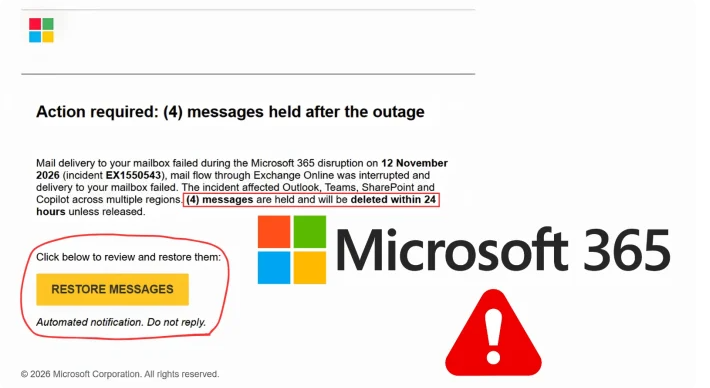
A real example of the phishing email, annotated by Cloudeli. The circled deadline and RESTORE MESSAGES button are the warning signs. This email is not from Microsoft.
It works because the details are real. Your staff really did see Outlook, Teams and other Microsoft 365 services disrupted, and the incident number is genuine. The attackers simply attach a fake call to action to a real event.
This matters, because Microsoft 365 does have a real feature that looks similar. Organisations can turn on quarantine notifications, which list messages held back by spam, phishing or malware filtering. Depending on how your admin has set them up, they can include actions such as Review message and Release. Microsoft documents these on its quarantine notifications page.
Genuine quarantine notifications are about filtering, not outages, and they don't threaten to delete your mail within 24 hours. The safe habit is the same either way: don't use the link in the email. If you want to check whether anything is genuinely held, type https://security.microsoft.com/quarantine into your browser yourself, or ask your IT team.
The button leads to a fake Microsoft sign-in page. If a user enters their details there, the attacker can:
Outage-themed phishing is a reminder that attackers watch the news too. Any widely reported disruption, whether Microsoft 365, a bank or a courier, quickly becomes a phishing lure. Regular security awareness training helps staff recognise the pattern, whatever the story of the day.
Cloudeli's managed packages include protection against this kind of attack. Cloudeli Secure adds Check Point Harmony email security with anti-phishing for email, Teams and SharePoint, and Cloudeli Complete adds security awareness training and phishing simulations. If you think someone has clicked, contact us and we'll help you lock the account down.
Based on phishing samples seen by Cloudeli and information published by Microsoft, publicly available at the time of writing (16 November 2026 SGT). Details may change as the situation develops.
No. It's a phishing email that uses the real 12–13 November 2026 Microsoft 365 outage to look convincing. It pressures you to click a "RESTORE MESSAGES" button before your mail is deleted, which leads to a fake sign-in page.
No. Delayed mail doesn't need you to click anything in an email to be delivered. If you're worried a specific message is missing, ask your IT team rather than using a link in an email.
Some organisations turn on Microsoft quarantine notifications, which list messages held by spam or malware filtering and can include a Release action. They aren't tied to outages. To check safely, sign in yourself at security.microsoft.com/quarantine rather than clicking a link.
Contact your IT support immediately, change your Microsoft 365 password from a trusted device, and keep the email for investigation. Your IT team should also check for new inbox forwarding rules, unfamiliar sign-ins and new MFA methods.
In the Microsoft 365 admin center under Health, Service health. Look up the incident there rather than following links received by email.
Contact us straight away. We'll check sign-ins, inbox rules and MFA methods on the affected account, lock it down, and help you brief your team.
